

Abex Image to Word OCR Converter
Abex Image to Word OCR Converter is an easy to use and powerful convert Image To Word document for creating editable and searchable DOC, DOCX, DOCM, RTF files from scanned image documents, digital camera images etc. It supports most of popular image formats, e.g. JPEG, JPG, BMP, PNG, GIF, TIFF, TIF, PSD, WMF, EMF, JP2, J2K, PCX etc. With the best OCR technology in the market, the application can retain the original layout perfectly. Abex Image to Word OCR Converter can recognize multiple languages, including English, French, German, Russian ,Italian, Spanish and Portuguese.
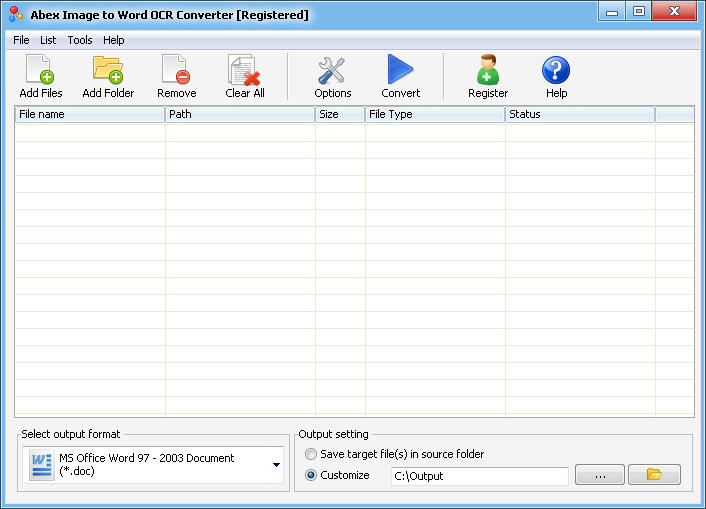
Just add the Image document to the application and choose output option, it will do the conversion successfully in a short while. Abex Image to Word OCR Converter is also an expert in batch conversion. User-friendly interface is very easy to use without any learning curve.
With Abex Image to Word OCR Converter , you can:
- Convert Image to editable Word DOC, DOCX, DOCM, RTF.
- Don't requires Adobe Acrobat and other third-party application.
- Take the best OCR technology.
- Fully compatible with Windows 7/8.
| Price: $49.95 |  |
 |
Key Feature of Abex Image to Word OCR Converter
Input image formats: JPEG, JPG, BMP, PNG, GIF, TIFF, TIF, PSD, WMF, EMF, JP2, J2K, PCX etc.
Convert Image files to editable Word DOC, DOCX, DOCM or RTF documents.
Best OCR technology.
Support recognition of multiple language characters. Such as English, French, German, Russian ,Italian, Spanish and Portuguese.
Software is easy to use and graphical user interface based.
Batch convert multiple Image files to editable Word, RTF at a time.
Support drag and drop operation.
Add multiple Image files in a directory (Include sub folders) together.
Support of multipage TIFF, TIF, GIF files.
Extract text content form Image into editable Word, RTF document easily.
The whole process of conversion can be finished just in a few of clicks.
Support rename output file if file exist or overwrite the file.
Support save and load the converted file list.
Can save the converted Word RTF files in a default output folder after conversion.
Support save target files in source folder.
Convert each file to separate directory within output folder.
The speed is really fast and the output quality is great.
More...
Free Technical Support and lifetime free Upgrade let you feel reassured to use the our software.
Trial Limitation: Conversion limitations, Registration will unlock all limitations.

| Input Format |
|---|
| Image (JPEG, JPG, BMP, PNG, TIFF, TIF, GIF, EMF, WMF, PSD, PCX, JP2, J2K) |
| Output Format |
|---|
| MS-Word 97-2003 2007 2010 2013 2016 2019 2021 ( DOC, DOCX, DOCM) |
| RTF |
OS Support: Windows Vista, Windows 7/8/10/11
Processor: 1GHz Intel/AMD processor or above
RAM: 256MB RAM (512MB or above recommended)
Free Hard Disk: 100MB space for installation
Ready to try or buy Abex Image to Word OCR Converter?
|
|
Awards